WINDOWS FORENSICS
Professional Windows Forensics – Securing and analysing digital evidence to stand up in court
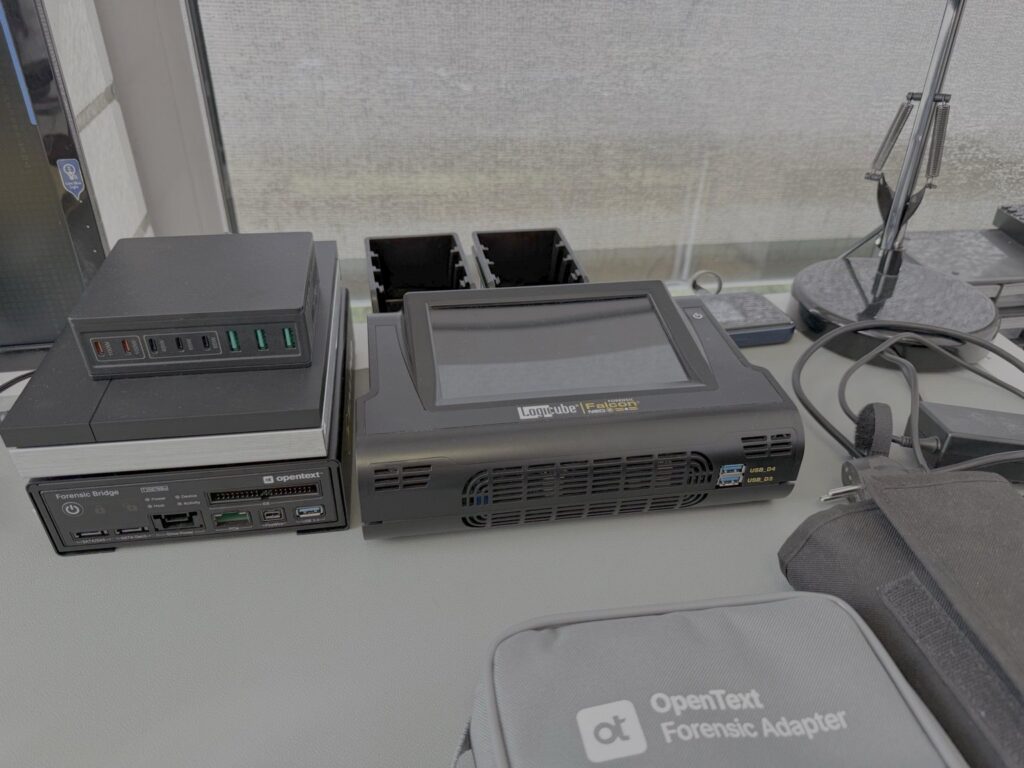
Since its foundation, LanCologne has specialised in professional IT forensics. Our staff have decades of experience in the field of information technology and assist companies, solicitors, private individuals and, on a regular basis, the courts in the technical investigation of complex digital matters.
Unsere Untersuchungen erfolgen nach anerkannten IT-forensischen Grundsätzen. Besonderen Wert legen wir auf die gerichtsfeste Sicherung digitaler Beweismittel, eine objektive Arbeitsweise sowie eine nachvollziehbare Dokumentation sämtlicher Untersuchungsschritte. Moderne forensische Werkzeuge werden – soweit erforderlich – durch manuelle Analysen ergänzt, um technische Feststellungen unabhängig zu verifizieren.
TECHNICAL BACKGROUND
Technical Fundamentals
Unsachgemäße Untersuchungen können digitale Beweismittel verändern oder sogar vernichten. Deshalb wird das Originalbeweismittel nach der forensischen Sicherung nicht für die inhaltliche Analyse verwendet. Die Untersuchung erfolgt ausschließlich auf Grundlage einer forensischen Kopie, deren Übereinstimmung mit dem Original durch kryptographische Hashwerte dokumentiert wird. Dadurch bleibt das Original unangetastet und sämtliche Untersuchungsschritte können jederzeit reproduziert und überprüft werden. Gerade in gerichtlichen Verfahren ist dies eine wesentliche Voraussetzung für die Nachvollziehbarkeit technischer Feststellungen.
OUR APPROACH
This is how your examination will be carried out
A transparent process – from the initial enquiry to the handover of the report.
TYPICAL QUESTIONS
When is this analysis required?
- ✔Verdacht auf Datendiebstahl
- ✔Allegations of manipulation
- ✔Arbeitsrechtliche Auseinandersetzungen
- ✔Cyberangriffe und Incident Response
- ✔Datenschutzvorfälle
- ✔Analyse möglicher Schadsoftware
- ✔Support for legal proceedings
- ✔Privatgutachten
LIMITATIONS & CONCLUSION
What you should know
Wir untersuchen Windows-PCs, Notebooks und Server bei Verdacht auf Datenmanipulationen, Datendiebstahl, Cyberangriffe oder Schadsoftware. Zum Leistungsumfang gehören unter anderem die gerichtsfeste Datensicherung, die Analyse von Dateisystemen, Registry, Event-Logs, Browserdaten, USB-Artefakten, Benutzerprofilen sowie die Erstellung nachvollziehbarer Privatgutachten und technischer Gutachten für Rechtsanwälte und Gerichte.
CUSTOMER REVIEWS
What our customers say
4.8 out of 5 stars on Trustpilot · 54 reviews
“The highest standards of professionalism, prompt service and excellent communication. They made the seemingly impossible a reality. This is what genuine customer service is all about – unrivalled in Germany!”
idalein
Verified review on Trustpilot
“Very helpful advice, excellent responsiveness and communication. My problem was completely resolved and the lost data was recovered. I’m very satisfied and, of course, relieved!”
Layla Pankratz
Verified review on Trustpilot
“My problem was sorted out professionally and quickly; everyone I spoke to was always friendly, and I can still get in touch if I have any questions – I’m very grateful for that!”
a woman from Cologne
Verified review on Trustpilot
Enquire now – free initial consultation
Sie benötigen Unterstützung bei der Aufklärung eines digitalen Sachverhalts? LanCologne unterstützt Sie bei der gerichtsfesten Sicherung digitaler Beweismittel, der Analyse von Windows-Systemen sowie der Erstellung nachvollziehbarer IT-forensischer Gutachten.
RELATED TOPICS
You might also be interested in
FREQUENTLY ASKED QUESTIONS
Frequently Asked Questions
Click on a question to see the answer.
Do you have any further questions?
THEMENÜBERSICHT
Windows-Forensik im Detail: Alle Themen im Überblick
Über die grundlegende Vorstellung hinaus untersuchen wir eine Vielzahl einzelner Windows-Artefakte und Systembereiche im Detail. Die folgende Übersicht gliedert unsere Themenseiten nach Sachgebieten.
Dateisystem & Datenträgerstrukturen
- Forensic analysis of the NTFS file system – The foundation of virtually every Windows investigation
- Forensic Analysis of the Master File Table (MFT) – The Heart of the NTFS File System
- Forensic analysis of the USN Journal – tracking changes on Windows systems
- Windows Volume Shadow Copies forensisch analysieren – Frühere Dateistände und Systeminformationen nachvollziehen
- Forensic analysis of Windows Registry transaction logs – tracing changes to the Registry
Registry, Systemkonfiguration & Verwaltung
- Forensic Analysis of the Windows Registry – One of the most important sources of information in Windows forensics
- Forensic Analysis of Windows User Accounts (SAM) – Evaluating Local Accounts and Security Information
- Forensic analysis of the Windows SECURITY hive – understanding security configurations
- Windows SOFTWARE-Hive forensisch analysieren – Software- und Systemkonfigurationen rekonstruieren
- Windows SYSTEM-Hive forensisch analysieren – Systemkonfigurationen und Hardwareinformationen rekonstruieren
- Forensic analysis of the Windows BCD – Understanding boot configurations
- Forensic analysis of Windows Setup API logs – tracing device installations
- Windows WMI forensisch analysieren – Persistenzmechanismen und Systemaktivitäten nachvollziehen
- Forensic analysis of Windows Group Policy – Understanding system configurations
- Windows Sicherheitsrichtlinien forensisch analysieren – Sicherheitskonfigurationen nachvollziehen
- Windows Active Directory-Artefakte forensisch analysieren – Domänenaktivitäten technisch nachvollziehen
- Forensic Analysis of Windows PowerShell Artifacts – Tracing Commands and Activities
Protokolle & Systemüberwachung
- Forensic analysis of Windows event logs – evaluating system events in a traceable manner
- Forensic Analysis of Windows ETL Logs – Tracing Detailed System Events
- Forensic analysis of Windows Sysmon artefacts – tracing processes, network connections and system events
- Windows Performance Monitor und Performance Logs forensisch analysieren – Systemzustände nachvollziehen
- Windows Reliability Monitor forensisch analysieren – Systemänderungen und Fehler chronologisch nachvollziehen
- Windows Error Reporting (WER) forensisch analysieren – Programmabstürze und Systemfehler nachvollziehen
Programmausführung & Nutzeraktivität
- Forensic analysis of Windows Prefetch files – identifying evidence of programme execution
- Forensic analysis of LNK files – reconstructing user activities in a traceable manner
- Forensic analysis of jump lists – Important insights into user activity
- ShellBags forensisch analysieren – Ordnerzugriffe und Benutzeraktivitäten rekonstruieren
- Forensic analysis of Amcache – evidence of programmes and system activity
- Forensic analysis of ShimCache (AppCompatCache) – evidence of applications that have been run
- SRUM forensisch analysieren – System- und Netzwerkaktivitäten nachvollziehen
- Windows Timeline forensisch analysieren – Benutzeraktivitäten chronologisch nachvollziehen
- Forensic analysis of the Windows Activity Cache – reconstructing user activities
- Forensic analysis of Windows AppCompat artefacts – tracing programme executions and compatibility
Gelöschte Daten, Auslagerung & Speicherforensik
- Forensic analysis of the Windows Recycle Bin – Tracing deleted files
- Windows Papierkorb (.Bin) vertieft forensisch analysieren – Löschvorgänge nachvollziehen
- Windows-Auslagerungsdatei (pagefile.sys) forensisch analysieren
- Windows pagefile.sys vertieft forensisch analysieren – Ausgelagerte Speicherinhalte rekonstruieren
- Forensic analysis of the Windows hibernation file (hiberfil.sys)
- In-depth forensic analysis of Windows’ hiberfil.sys – Reconstructing saved RAM contents
- Forensic analysis of the Windows swapfile.sys – Evaluating additional memory artefacts
- Windows Memory Dumps forensisch analysieren – Flüchtige Daten aus dem Arbeitsspeicher auswerten
- Forensic analysis of Windows RAM dumps – Securing ephemeral evidence from main memory
- Forensic analysis of Windows crash dumps – Technical reconstruction of system crashes
- Windows Live Response Artefakte forensisch analysieren – Flüchtige Systeminformationen sichern
- Forensic analysis of Windows ReadyBoot and ReadyBoost artefacts – tracing boot processes and system usage
- Windows Thumbnail Cache forensisch analysieren – Vorschaubilder als digitale Spur
Autostart, Dienste & geplante Aufgaben
- Forensic Analysis of Windows Services – Investigating Persistence and System Configuration
- Forensic analysis of Windows autostart entries – identifying persistence mechanisms
- Geplante Aufgaben (Scheduled Tasks) forensisch analysieren – Automatische Abläufe nachvollziehen
- Forensic analysis of the Windows Print Spooler – Technical investigation of print jobs
- Forensic analysis of Windows COM artefacts – tracing components and system activities
- Forensic Analysis of Windows COM+ – Tracing Distributed Components and Services
Sicherheit & Verschlüsselung
- Forensic analysis of Windows BitLocker artefacts – understanding encryption status and system information
- Windows Credential Manager forensisch analysieren – Gespeicherte Anmeldeinformationen nachvollziehen
- Forensic Analysis of Windows DPAPI – Tracing Protected User Data and Keys
- Forensic Analysis of Windows EFS – Examining Encrypted Files and Certificates
- Windows Zertifikatsspeicher forensisch analysieren – Digitale Zertifikate und Vertrauensstellungen nachvollziehen
- Windows Defender-Artefakte forensisch analysieren – Sicherheitsereignisse nachvollziehen
- Windows Microsoft Defender for Endpoint (MDE) Artefakte forensisch analysieren – Sicherheitsereignisse nachvollziehen
- Forensic analysis of Windows Defender Antivirus artefacts – tracing security events
- Windows Antiviren- und Sicherheitssoftware forensisch analysieren – Sicherheitsereignisse technisch bewerten
- Windows EDR-Artefakte forensisch analysieren – Sicherheitsereignisse und Angriffsketten rekonstruieren
- Forensic analysis of Windows Defender Application Control (WDAC) – Understanding application policies
Netzwerk & Kommunikation
- Forensic analysis of Windows network profiles – tracing network connections and configurations
- Windows WLAN-Artefakte forensisch analysieren – Drahtlose Netzwerkverbindungen nachvollziehen
- Windows RDP-Artefakte forensisch analysieren – Remote-Desktop-Verbindungen nachvollziehen
- Forensic Analysis of Windows SMB Artifacts – Tracing Network Shares and File Accesses
- Forensic analysis of Windows VPN artefacts – tracing VPN connections and configurations
- Windows DNS-Client-Artefakte forensisch analysieren – Namensauflösungen und Netzwerkaktivitäten nachvollziehen
- Windows DNS-Cache forensisch analysieren – Netzwerkaktivitäten nachvollziehen
- Forensic analysis of Windows proxy artefacts – Understanding proxy configurations and network communication
- Windows Hosts-Datei forensisch analysieren – Manuelle Namensauflösungen nachvollziehen
- Forensic analysis of Windows TCP/IP configuration – Understanding network settings
- Forensic analysis of Windows network adapters – understanding network interfaces and system configuration
- Windows Firewall-Artefakte forensisch analysieren – Netzwerkkommunikation und Konfigurationsänderungen nachvollziehen
- Forensic Analysis of Windows Bluetooth Artifacts – Tracing Paired Devices and Connections
- Forensic analysis of Windows Nearby Sharing – Reconstructing local file transfers
Externe Geräte & Datenaustausch
- Forensic analysis of Windows USB artefacts – Tracing connected devices
- Windows MountPoints2-Artefakte forensisch analysieren – Hinweise auf angeschlossene Datenträger
- Windows Device Metadata Cache forensisch analysieren – Hinweise auf erkannte Hardware
- Windows Portable Devices (WPD) forensisch analysieren – Mobile Geräte als digitale Spur
- Forensic Analysis of Windows Offline Files (CSC) – Analysing Cached Network Files
- Forensic analysis of Windows synchronisation artefacts – tracing synchronisation processes
- Windows OneDrive-Artefakte forensisch analysieren – Lokale Cloud-Spuren technisch bewerten
- Forensic analysis of Windows Delivery Optimisation – tracing Update and transmission artefacts
Anwendungen, Pakete & Updates
- Forensic analysis of Windows Update artefacts – tracing installations and system changes
- Forensic analysis of Windows Microsoft Store artefacts – Tracing installed apps and updates
- Forensic Analysis of Windows AppX Packages – Understanding Modern Windows Applications
- Forensic Analysis of Windows MSIX Packages – Understanding Modern Application Installations
- Forensic Analysis of Windows Hyper-V Artefacts – Understanding Virtual Infrastructures
- Forensic Analysis of Windows Sandbox Artifacts – Tracing Temporary Execution Environments
Benutzerprofile, Dateien & lokale Spuren
- Windows-Benutzerprofile forensisch analysieren – Benutzeraktivitäten nachvollziehen
- Windows AppData forensisch analysieren – Anwendungs- und Benutzerdaten auswerten
- Windows Temp-Dateien forensisch analysieren – Temporäre Artefakte als digitale Beweismittel
- Forensic analysis of the Windows Search database – Tracing indexed files and search information
- Windows Search Index forensisch analysieren – Indizierte Daten und Dateiverweise nachvollziehen
- Windows Clipboard History forensisch analysieren – Inhalte der Zwischenablage als digitale Beweisspur
- Forensic analysis of the Windows Notification Database – notifications as digital evidence
- Forensic analysis of the Windows font cache – clues regarding document and programme usage